TEFAL إيزي فراي آند جريل ديجيتال

إيزي فراي آند جريل ديجيتال أول قلاية صحية هوائية 2 في 1: آير فراي آند جريل من تيفال

استمتع بطهي صحي باستخدام جهازين في جهاز واحد! يجمع جهاز إيزي فراي آند جريل بريسشن 2 في 1 بين قلاية من دون زيت وشواية للقلي الصحي بقليل من الزيت أو بدون زيت، بالإضافة إلى الشواء الذي لا تشوبه شائبة بكل راحة في مطبخك. تجعل البرامج الثمانية التلقائية النتائج مثالية بكل سهولة، في حين يمثل الطهي السريع البديل المثالي للفرن الكلاسيكي. تُعد السعة XL التي تبلغ 4.2L/1.2kg مثالية للوجبات الوفيرة بما يكفي 6 أشخاص، ويتوافر معه تقنية شواء وشبكة مصبوبة من الألومنيوم، مما يتيح لك تحمير أي نوع طعام بشكل رائع. احصل على الإلهام لتحضير وصفات سهلة ولذيذة لإبهاج العائلة بالكامل بفضل كتيب الوصفات الرقمي. اكتشف قلاية من دون زيت وشواية، الكل في واحد، للطهي المتنوع والسهل والصحي يومًا بعد يوم. 

الرقم المرجعي: EY505D27

حل 2 في 1 متعدد الاستعمالات

اكتشف حل 2 في 1، للحصول على مقلاة صحية بدون زيت و شواية الكل في واحد! إنها أكثر من مجرد قلاية من دون زيت، حيث توفر التكنولوجيا المزدوجة الحصرية شبكة شواء مصبوبة في قالب من الألومنيوم للحم الطري والمليء بالعصارة أو الخضراوات، وذلك للتحمير بشكل رائع. وبالطبع، تضمن وظيفة القلاية الكلاسيكية بدون زيت الحصول على نتائج قرمشة ذات لون ذهبي على أطعمتك المقلية اللذيذة المفضلة بإضافة قليل من الزيت أو بدون زيت. يسهل تحقيق نتائج مثالية بفضل 8 برامج تلقائية، ولوحة تحكم رقمية سهلة الاستخدام، وميزة المؤقت المريح. من الممكن أيضًا تجفيف الطعام لتحضير وجبات خفيفة لذيذة وصحية من مطبخك الخاص، مثل الفاكهة أو الخضراوات المجففة. بفضل السعة XL، يمكن لجهاز إيزي فراي آند جريل بريسشن تحضير ما يكفي العائلة بالكامل. إنه البديل المثالي للفرن التقليدي للحصول على نتائج سريعة واستهلاك طاقة أقل! ماذا تنتظر الآن؟

دهون مضافة أقل بنسبة 99%: طهي 700g من البطاطس الطازجة باستخدام 8ml من الزيت مقابل القلي العميق التقليدي باستخدام 2L

الأساسيات
  • تقنية القرمشة الإضافية

    تقدم تقنية القرمشة الإضافية التوازن المثالي بين درجة الحرارة وتدفق الهواء الساخن للحصول على أطعمة مقرمشة بلون ذهبي بقليل من الزيت أو بدون زيت—استمتع بدهون مضافة أقل بنسبة 99% عن المقدار المُستخدم في مقلاة عميقة!*

  • تقنية الشواء

    شبكة شواء مصبوبة في قالب من الألومنيوم مناسبة للحم الطري والمليء بالعصارة أو الخضراوات، وذلك للتحمير بشكل رائع في مطبخك.

  • أسرع من الفرن الكلاسيكي

    يجري تصميم إيزي فراي 2 في 1 عمليات الطهي أسرع بمقدار الضعف تقريبًا* عن الفرن الكلاسيكي، مع استهلاك طاقة أقل.

    *أسرع بنسبة 49%: اختبار خارجي، تم تنفيذه على طهي 700g من البطاطس المجمّدة، مقارنة بفرن مولينكس/تيفال التقليدي

  • 8 برامج تلقائية

    حضّر بشكل مثالي مجموعة من الأطباق بسهولة تامة، بمفضل 8 برامج طهي تلقائية (البطاطس المقلية، والناجتس، والدجاج المشوي، والبيتزا، والسمك، واللحم، والخضراوات، والحلويات).

  • درجة حرارة قابلة للتعديل

    التحكم عالي الدقة بدرجة الحرارة بداية من ‎80°C إلى ‎200°C، مما يضمن نتائج مثالية في كل مرة مهما كانت الوصفة!

  • مزايا للاستخدام المريح

    لوحة تحكم رقمية سهلة الاستخدام مع مؤقت لمدة 60 دقيقة وتنبيه تلقائي، مما يوفر الراحة التامة.

  • سعة XL

    تُعد السعة الكبيرة التي تبلغ 4.2L/1.2Kg مثالية لتحضير وجبات لذيذة للعائلة والأصدقاء—بما يصل إلى 6 أفراد.

  • كتيب وصفات رقمي

    30 وصفة شهية ابتكرها طاهينا الحصري لإلهامك يومًا تلو الآخر.

الوصفات
الميزات
طاقة 1550  W
إيقاف تلقائي    
آمنة لغسالة الصحون    
Voltage 220-240  V
التردد 50-60  Hz
Air fryer mono  
8  
نوع القابس المملكة المتحدة  
Power 1550  W
   
التعليمات والدليل
أسئلة شائعة
The WiFi icon, especially visible from the home screen, indicates whether your product is connected or not.

WiFi icon crossed outThe product is not connected.
WiFi icon exclamation markThe product is connecting.
WiFi iconThe product is connected.
Your account, to be created from the app, allows you to benefit from additional services related to the interaction of your app with your product:
• Find the recipes saved in your notebooks and favourites directly on the robot's screen.
• Follow remotely the progress of the recipe on your product and receive recipe notifications.
• Display on your product a recipe that you have selected in the application.


From the home page of your device, go to "Settings" and select "Associate an account".
• Download the application on your smartphone from the Google Play store or the App Store.
• From the app, add the product you own and then create an account or sign in.
• An association code is generated. Enter it in your application.
Even if your product doesn't need a very fast WiFi connection to work, the received WiFi signal must still be stable.
If the screen displays a connectivity error, you can move the product closer to your box or add a WiFi repeater (see FAQ 'I don't have WiFi access in my kitchen').
If your product loses the WiFi connection during a recipe, you will be able to finish your recipe without any inconvenience.
However, the videos of that recipe will no longer be accessible until the connection is re-established.
If the WiFi connection is interrupted during an update, this cannot be completed. Your product will be able to reboot to its current version and this update will be rescheduled the next time you start it.
If your smartphone loses internet connection (WiFi or 4G) during a recipe it will have no impact on your product which will be able to execute the recipe without any problem. You will simply no longer be able to follow the progress of the recipe remotely on your smartphone and you will no longer receive notifications about the end of a step or the addition of an ingredient.
Your product can only be associated with one account.
However, any application that is connected to this account can interact with this product.
If you have a tablet and a smartphone, or if other members of your household want to interact with your product, they can simply connect their application using your account.
As soon as an update is available, your product when it connects to the WiFi will suggest you to do the update.


Some updates are priorities for security reasons and you will need to perform them before you can use your product.
Others may be delayed. You can then perform them now or later by going to your product's settings.
If an update fails, you can download it again.
If despite several attempts you are unable to install it, move the product closer to your box, the connection from your kitchen may be too weak to download it.
If the update fails even close to your box, please contact our customer service.
Yes, your device can be used with several smartphones or tablets, even if your product can only be associated with a single account.
So if you own a tablet and a smartphone, or if other members of your household wish to interact with your product, they simply need to connect their application using your account.
If your product is associated with your user account, you will be able to follow the progress of your recipe on your application.
You will also receive end-of-stage or alert notifications.
If you do not receive these notifications, please enable them in your iOS or Android settings.
To remotely send a recipe from your application to your product, simply open a recipe and click on the icon with your product.
If your product is on standby, it will open on your product as soon as it connects to Wifi.
If the product is running, it will be displayed in a few seconds if your product is not already making another recipe.
Place your device on a flat, stable surface.
To obtain an optimal connection between your device and your box, it is recommended to position your device in a place where the Wifi signal received from your box is strong. You can test the connection by positioning your smartphone at the location of your product to see if the WiFi signal received at that location is strong enough.
If the connection is interrupted (connection symbol crossed out), please bring your device and your box closer together to reestablish the connection.
The presence of the fixed connection indicator (application or product) ensures that your devices are connected.
If your product loses the WiFi connection during a recipe, you will be able to finish your recipe without any inconvenience.
• From the home page of your appliance, go to "Settings" and select "Connectivity and Account".
• Download the app on your smartphone from the Google Play store or the App Store.
• From the app, create an account or log in to an existing account then add the product you own.
• Follow the different steps displayed successively on the product and on the app.
• An association code is generated. Enter it in your app.
Your Cookeo connects to WiFi using your phone:
• From the home page of your appliance, go to "Settings", select "Connectivity and Account" then "Activate connection".
• Follow the steps that will suggest you to download the app on your smartphone from the Google Play store or the App store.
• From the app, create an account or log in then add the product you own.
• Follow the different steps displayed successively on the product and on the app.
يلزم عليك إنشاء حساب وتسجيل الدخول إلى التطبيق للوصول إلى هذه الميزة.

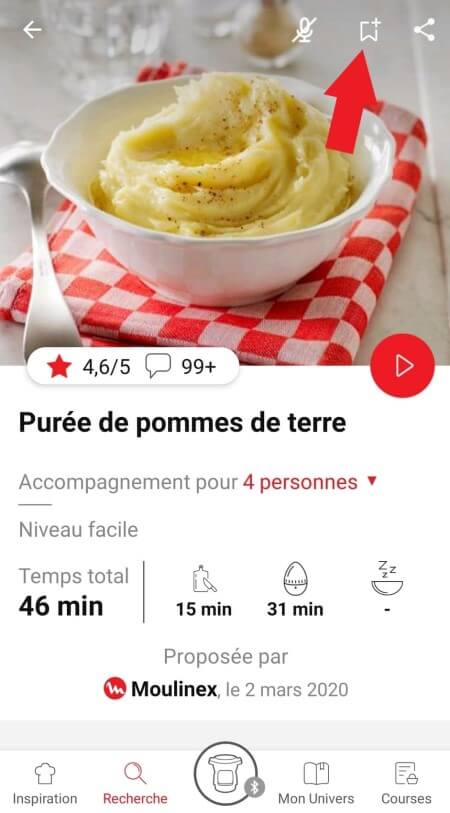
• انتقل إلى الوصفة التي تريد إضافة إشارة مرجعية لها وحدد شعار الإشارة المرجعية في الزاوية اليمنى العلوية.
highlighting the bookmark function in the Companion app
• تظهر علامة التبويب "My Notebooks" (دفاتر ملاحظاتي): حدد موقع "My Favorites" (المفضلة).
• تمت إضافة الوصفة.
• اختر علامة التبويب "Search" (بحث) من شريط التنقل.
• أدخل كلمة في حقل البحث.

نصيحة: تم العثور على الوصفات باستخدام الكلمات الرئيسية ، لذلك من الأسهل إدخال نوع من الخضار (مثل الجزر) بدلاً من مجرد الخضار.
يحتوي التطبيق على محتوى ثري ويتطلب اتصال Wi-Fi ثابتًا حتى يتم تنزيله بشكل صحيح.
إذا لم يتم تنزيل التطبيق بشكل صحيح، فقم بحذفه وحاول تنزيله مجددًا حينما يتوفر لديك اتصال Wi-Fi أكثر ثباتًا.
وأثناء التثبيت الأولي، قد يستغرق التنزيل عدة دقائق بينما يقوم التطبيق بحفظ جميع الصور الموجودة على الهاتف الذكي أو الكمبيوتر اللوحي الموجود لديك.
يتعيّن عليك إنشاء حساب وتسجيل الدخول إلى التطبيق لكي تصل إلى هذه الميزة.
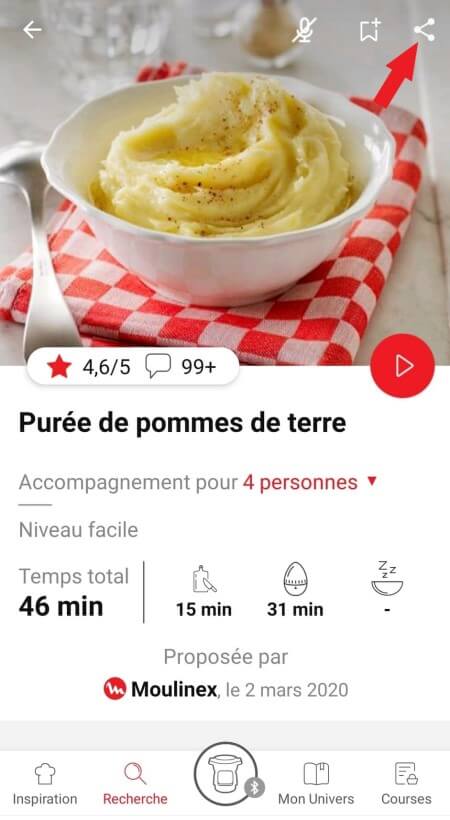
انقر فوق شعار المشاركة لعرض خيارات المشاركة.
highlighting the sharing functionality in the Companion app
يمكنك بعد ذلك اختيار طريقة مشاركة هذه الوصفة.
يستخدم التطبيق إشعارات لتنبيهك عند انتهاء أوقات الطبخ باستخدام إشارة صوتية.
إذا أردت إيقاف تشغيل هذه الإشارة، يمكنك إيقاف تنشيطها بسهولة من الكمبيوتر اللوحي أو الهاتف الذكي.
يمكنك أيضًا تعطيل الأصوات في إعدادات المعلمات للإشعارات على الهاتف أو الكمبيوتر اللوحي.
لا يستخدم التطبيق إشعارات لتنبيهك عند انتهاء الطهي فحسب، ولكن أيضًا لإعلامك بالمحتويات الجديدة (معلومات، وصفات...) المتاحة.
يمكنك تعطيلها، إذا أردت ذلك، من إعدادات الهاتف الذكي.
بإمكانك اختيار عدم قبول ملفات تعريف الارتباط.
ولكن، سيظل شعار ملفات تعريف الارتباط الرمادي على الشاشة طالما لم تنقر فوق "accept" (موافق).
تُستخدم ملفات تعريف الارتباط لقياس نسبة الجمهور وإضفاء طابع شخصي حتي يتسنى لنا تحسين استخدامك للمنتج.

تساعدنا حلول قياس نسبة الجمهور على تحليل حركة المرور والاتجاهات السائدة والاستخدام، بالإضافة إلى اكتشاف الأعطال في سبيل تحسين تجربتك.

كما تساعدنا حلول إضفاء الطابع الشخصي على تحسين جودة المعلومات والخدمات التي نقدمها، بالإضافة إلى توفير تجربة أكثر متعة لك.

يمكنك قبول أو رفض استخدام ملفات تعريف الارتباط عند تشغيل جهازك للمرة الأولى.
بمجرد الانتهاء من بحثك، تسهّل عليك عوامل التصفية الخاصة العثور على وصفات تلبي احتياجاتك.

عامل التصفية القابل للتخصيص:
• انقر فوق "Filter" (عامل التصفية) من أجل تصنيف الوصفات وفقًا لنوع الوجبة (مقبلات أو الطبق الرئيسي أو الحلوى)، والوقت الذي تستغرقه لإعداد الوصفة، والحد الأدنى للتقييم، ومواضيع الوصفات (أو مكوناتها)...
• كما يمكنك اختيار تحديد وصفات العلامة التجارية فقط أو الوصفات التي اقترحها لك المجتمع.

تصنيف الوصفات:
بمجرد الانتهاء من بحثك، يمكنك تصنيف وصفاتك حسب الشعبية والتقييم والمدة أو حسب الترتيب الأبجدي.
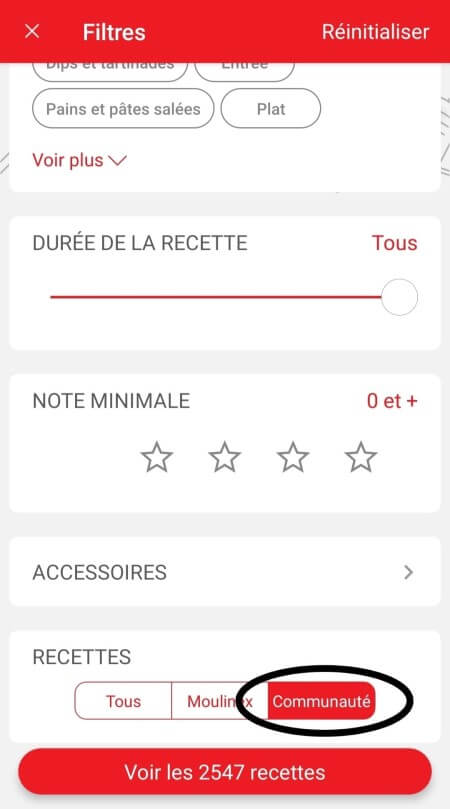
عند استخدام وظيفة البحث، قم باختيار "Filter recipes" (تصفية الوصفات).
في قسم "الوصفات"، قم باختيار "Community" (المجتمع) فقط.
ستستطيع بعد ذلك رؤية الوصفات من المجتمع.
recipe filters page in the Companion app
ينبغي عليك إنشاء حساب وتسجيل الدخول إلى التطبيق للوصول إلى تلك الميزات.

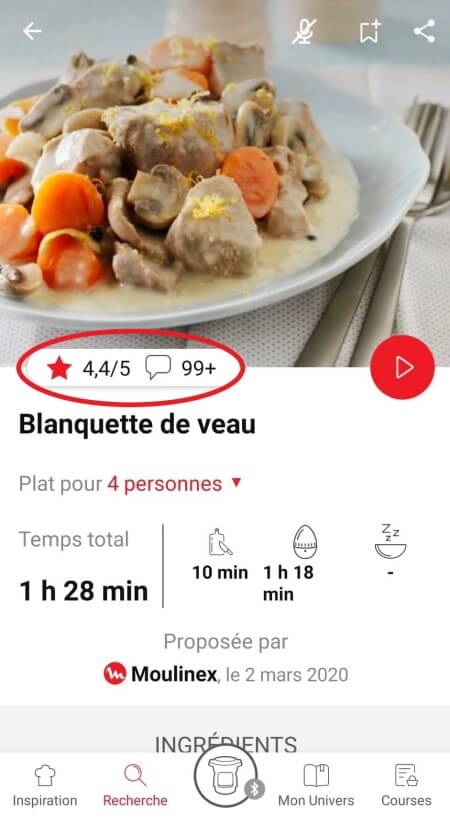
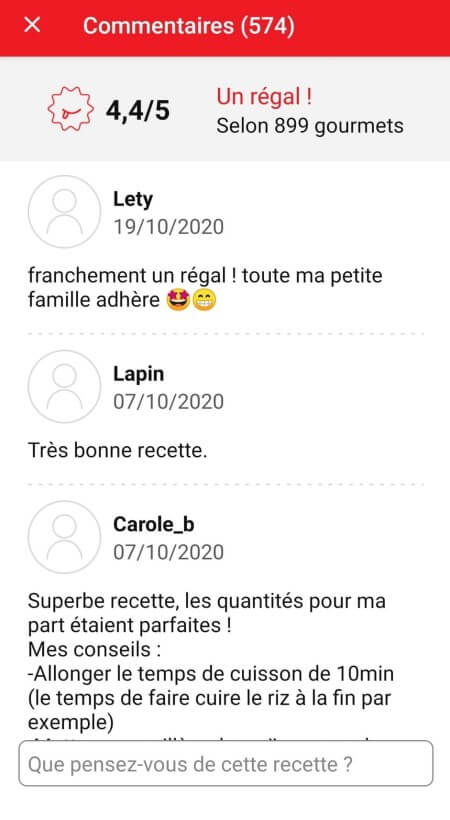
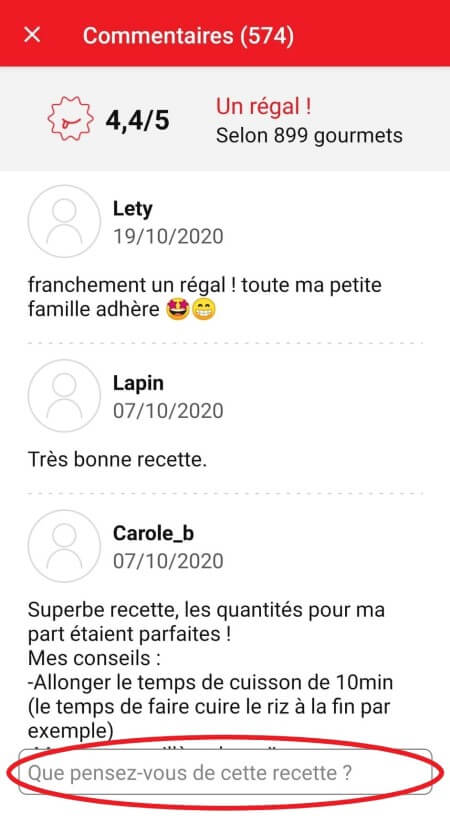
بمجرد تسجيل الدخول، ستستطيع قراءة التعليقات ورؤية الملاحظات التي كتبها أعضاء المجتمع بشأن الوصفة عن طريق النقر فوق حقل "notes/comments" (الملاحظات/التعليقات).
highlighting rating & comments feature from recipe page in the Companion appcomments page in the Companion app
ينبغي عليك إنشاء حساب وتسجيل الدخول إلى التطبيق للوصول إلى تلك الميزات.

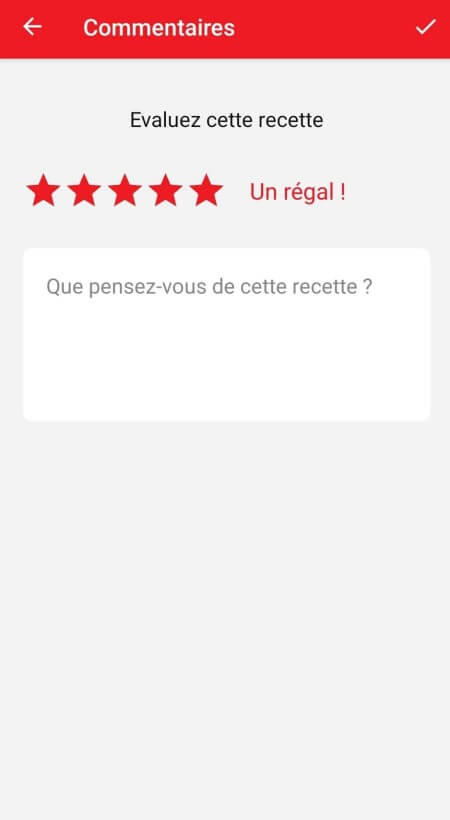
بمجرد تسجيل الدخول إلى حسابك، ستستطيع تقييم الوصفة وإضافة تعليق عن طريق اتباع التعليمات التي تظهر على الشاشة بعد النقر فوق حقل "notes/comments" (الملاحظات/التعليقات).
highlighting rating feature from comments page in the Companion apprating page in the Companion app
اختر علامة التبويب "My Universe" (عالمي) من شريط التنقل، ثم حدد الكتيب الذي ترغب في تعديله أو حذفه. انقر على رمز القلم أعلى يمين الشاشة، ثم حدد الإجراء الذي تريده ("Delete booklet" (حذف الكتيب) أو "Rename booklet" (إعادة تسمية الكتيب) أو "Delete recipes" (حذف الوصفات).
يلزم عليك إنشاء حساب وتسجيل الدخول إلى التطبيق للوصول إلى هذه الميزة.

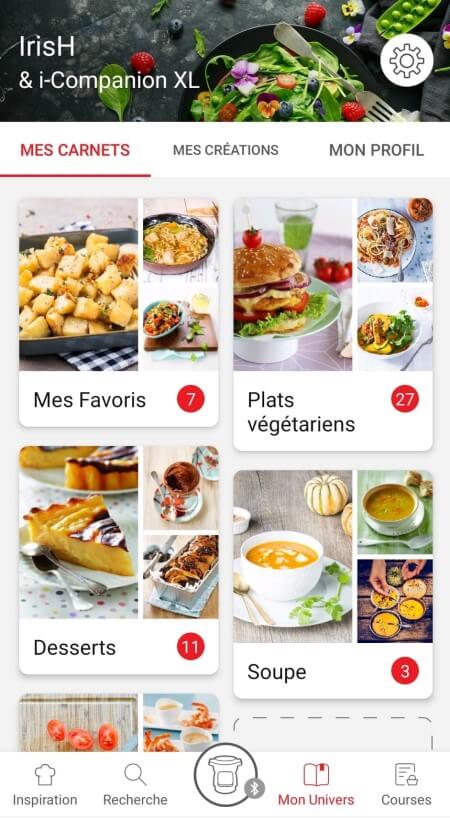
• اختر علامة التبويب "My Universe" (عالمي) من شريط التنقل.
• ستجد هناك كتيبات وصفاتك وستتمكن من إنشاء كتيبات جديدة عن طريق النقر فوق "New booklet" (كتيب جديد).
recipes booklets page in the Companion app
من المهم اختيار منتجك في التطبيق من أجل العثور على الوصفات المناسبة لذلك المنتج. وبتلك الطريقة، سيقترح التطبيق مئات الوصفات المثالية.
وسيتيح لك ذلك أيضًا إضافة المواد الأخرى والحصول على الوصفات المرتبطة.
لم يعد التطبيق متوافقًا مع إصدارات Android 4.4.4 أو الإصدارات الأقدم، وذلك بسبب تعزيز أمان البيانات.

بقدر الإمكان، نوصي بتحديث جهازك إلى إصدار Android أحدث أو استخدام جهاز آخر متوافق مع التطبيق.

لن تسمح لك التحديثات بالاستمتاع بتجربة أغنى فحسب بفضل ميزاتها الجديدة وتوافقها مع أحدث التقنيات، ولكنها ستحميك أيضًا من الثغرات الأمنية المحتملة التي تم إصلاحها في الإصدارات الأحدث.
• في "My universe" (عالمي)، حدد "My profile" (ملف تعريفي).
• انقر فوق صورة المنتج المسجل.
• انقر فوق "Remove the product" (إزالة المنتج). سيطلب منك التطبيق بعد ذلك اختيار منتج.
اغسلوا قطع البطاطس مرّتين بالماء قبل قليها حتى تتخلّصوا من النشاء الزائد. من الضروري تجفيفها قبل قليها بمنديل شاي نظيف ذات قدرة عالية على امتصاص السوائل ثم تجفيفها أخيرًا بورق المطبخ. إذا كنتم ستقلون بطاطس مجمّدة، فلن تحتاجوا إلى الزيت لأنها تحوي عليه وإضافته سيجعلها غير مقرمشة. إذا كنتم تستخدمون ميّزة 2 بـ1 (الوعاء + الصينية) بعد طهي الطعام على الصينية، اقلوا البطاطس لمدّة تتراوح ما بين 2 و5 دقائق إضافية بعد رفعها عن الصينية حتى تصبح مقرمشة.
إذا كنتم ستقلون بطاطس مجمّدة، فلن تحتاجوا إلى إضافة الزيت لأن هذا النوع يحتوي عليه.
توجد عدّة أسباب وراء ذلك:
• ربما استخدمتم نوع البطاطس غير المناسب.
•لم تغسلوا وتجفّفوا البطاطس بما يكفي قبل طبخها وما تزال تحوي على كثير من النشاء.
• أو أنّ البطاطس سميكة جداً. قطعوا البطاطس إلى شرائح أرفع.
• لم تستخدموا كميّة كافية من الزيت. ضعوا مزيدًا من الزيت.
• قد يكون الفلتر مسدودًا. لذلك، نظّفوا الفلتر.
يُمكن أن يؤثر حجم البطاطس على قرمشتها أو طراوتها.
فكلّما كانت البطاطس أرق، ازدادت قرمشتها، وبالعكس، فإذا ازدادت سماكتها تصبح أكثر طراوة في الداخل.
يُمكنكم تغيير وقت الطبخ وحجم تقطيع البطاطس بحسب رغبتكم: رقيقة: 8 بـ 8 ملم/العادية: 10 بـ 10 ملم/السميكة: 13 بـ 13 ملم.
حتى تحصلوا على أفضل النتائج، اغسلوا البطاطس بأكملها، ثمّ اغسلوها بعد تقطيعها في الكثير من الماء حتى تصبح مياه الغسل صافية.
يُساهم هذا الأمر في التخلّص من أكبر قدر ممكن من النشاء وبالتالي يمنع التصاقها.
جفّفوها بعد ذلك جيّدًا مستخدمين مناديل المطبخ الجافة وذات قدرة عالية على الامتصاص.
يجب أن تكون البطاطس جافة قبل طبخها.
يمكنكم تنويع المذاق واستخدام أنواع مختلفة من الزيوت!
الزيوت العاديّة: زيت الزيتون، زيت بذور اللفت، زيت بذور العنب، الذرة، الفول السوداني، دوار الشمس والصويا*
الزيوت المنكّهة بالأعشاب العطريّة، والفلفل والثوم والليمون…
الزيوت الخاصّة : البندق*، السمسم*، الزعفران، اللوز*، الأفوكادو*، الزيوت العضوية*،...
ننصح بعدم إستخدام زيت الجوز الذي يعطي مذاقا نتناً بعد الطهي.
(* زيت الطهي وفقا للمُصنّع)
لا تتجاوز الحد الأقصى للكميات أو أوقات التشغيل الموضحة في جدول الوصفات، وإلا فلن تحصل على النتيجة المتوقعة وقد تعرض جهازك للتلف.


• Start/Stop button: touch the white spot at the bottom of the screen to turn on your device.
• Touch screen: scroll the screen with your finger and select your feature.
• Back key: once you have selected a feature, a back button will appear at the bottom left to return to the previous screen. It does not appear when you are on the home screen.
On the home page, drag the menu to the right and select "Stand by".
Thanks to the function "In my fridge" you can indicate the ingredients that you have at your disposal and we will suggest suitable recipes.


• You can access this feature from the home screen.
• Add one or two ingredients by typing their name in the search bar and selecting it from the suggestions.
• You can then enter the weight of the added ingredients so that we can offer you recipes for those quantities.
لفتح الغطاء، اضغط على الغطاء برفق وقم بتدويره عكس اتجاه عقارب الساعة.
Access the home menu using the "Contextual Menu" touch button on the right side of the screen. This button also allows you to return to the home page.

Access the home menu using the "Contextual Menu" touch button on the right side of the screen. This button also allows you to return to put your appliance on standby.

When your appliance is in standby, simply press the dot on the rotary knob to take it out of standby.
Thanks to the library, find the recipes integrated in your appliance. Thanks to the connection with your application, you'll have access to more recipes from the brand and the community!

• You can access the recipe library from the "Inspiration" menu.
• Keep in mind that if you are not connected to the WiFi, you will only have access to the list of recipes integrated into your appliance.
• When you are in the library, you can scroll through the recipes.
• You can find the recipe booklets that you created with the app.
• You can access the recipe library from "My Universe".
• Please note that if you are not connected to your user account, no recipe will appear.
• You have to go through the app to add or remove recipes from your booklets.
The list of cookings by ingredients offers you cooking times and cooking modes adapted to the quantity you have at your disposal.
There are 5 categories of food: Starches, Vegetables, Fishes, Meats and Eggs.
You can access the ingredients cooking list from the home menu under "Cooking ingredients".
• Use only food-grade vacuum bags specific for cooking (not for storage).
• Do not reuse airtight cooking bags.
• Do not use vacuum boxes.
لا يتم تقطيع الطعام أو البطاطس المقلية بشكل متساوٍ. يلزم التقطيع بشكل متساوٍ للحصول على طهي مثالي.
لا توجد خطورة لسحب السلة للخارج أثناء الطهي، لكن لا ننصح بالقيام بذلك.
سيؤدي ذلك إلى خفض درجة الحرارة داخل الجهاز، وبالنسبة للوصفات "الذكية"، فقد يؤدي إلى تعطيل إعدادات الطهي المصممة للحصول على أفضل النتائج.
Express cooking allows you to cook very quickly your recipes for soups, purees, compotes, meat chunks recipes, pasta or rice dishes...

What you need to know:
• The filling level of the bowl should never exceed the MAX level.
• For food that can expand during cooking (rice, seeds, lentils, peas, etc.), do not fill the bowl beyond half its maximum capacity.
• The bowl should always be filled with a minimum of 250 ml of liquid.
• When the timer reaches 0 and the following screen appears, you will notice a release of steam at the back of the lid.

CAUTION: Do not put your hands near the steam outlet!
It is possible that a slight flow of steam may escape from the back of the product during cooking.
Strong browning allows you to brown ingredients strongly and gives a golden and crispy appearance to all types of ingredients such as potatoes, meat...

Ingredients should never be filled above the MAX level. The lid must always be open.

You control the cooking time. Leave the ingredients to cook until you are satisfied with the result. Then click 'STOP' to stop cooking.
Medium browning allows you to brown ingredients and give a golden, crispy appearance to ingredients such as meats, vegetables...

Ingredients should never be filled above the MAX level. The lid must always be open.

You control the cooking time. Leave the ingredients to cook until you are satisfied with the result. Then click 'STOP' to stop cooking.
Soft browning allows ingredients to be gently browned and gives a golden brown appearance to more sensitive ingredients such as fish fillets.

Ingredients should never be filled above the MAX level. The lid must always be open.

You control the cooking time. Leave the ingredients to cook until you are satisfied with the result. Then click 'STOP' to stop cooking.
Soft simmering allows dishes such as meat stews to simmer slowly and gently "over a low heat".

Ingredients should never be filled above the MAX level. The lid must always be open.

You control the cooking time. Leave the ingredients to cook until you are satisfied with the result. Then click 'STOP' to stop cooking.
Medium simmering allows dishes such as meat stews to simmer slowly "over a medium heat".

Ingredients should never be filled above the MAX level. The lid must always be open.

You control the cooking time. Leave the ingredients to cook until you are satisfied with the result. Then click 'STOP' to stop cooking.
Strong simmering allows dishes such as meat stews to simmer "over high heat".

Ingredients should never be filled above the MAX level. The lid must always be open.

You control the cooking time. Leave the ingredients to cook until you are satisfied with the result. Then click 'STOP' to stop cooking.
The "Yogurt" mode is accessible in the "Miscellaneous" manual modes.
The "Sous vide" mode is accessible in the "Miscellaneous" manual modes.
• Low temperature cooking is ideal for long cooking times, up to 12 hours, with the lid closed for a tender and very melting result.
• Classic simmering is used with the lid open to thicken or reduce a sauce at the end of cooking.
• The "Sous vide immersion" mode cooks the vacuum-sealed ingredients and immersed in 3L of water.
• The "Sous vide Eco" mode cooks the ingredients with only 5 cl of water using the steam basket.
• The "Gentle steam" mode is ideal for healthily cooking delicate ingredients such as fish and seafood.
• The "Boost steam" mode is more suitable for meat or vegetables.
Gentle low temperature cooking allows you to simmer dishes such as meat stews "on a low heat", with slow and gentle cooking at 75°C.

Ingredients should never be filled above the MAX level. The lid must always be closed.

You control the cooking time. Leave the ingredients to cook until you are satisfied with the result. Then click 'STOP' to stop cooking.
Strong Low temperature cooking allows dishes such as meat stews to be simmered "over medium heat", with slow cooking at 85°C.

Ingredients should never be filled above the MAX level. The lid must always be closed.

You control the cooking time. Leave the ingredients to cook until you are satisfied with the result. Then click 'STOP' to stop cooking.
Classic simmering allows you to heat from below like in a Dutch oven, to concentrate the flavors.

Ingredients should never be filled above the MAX level. The lid must always be open.

You control the cooking time. Leave the ingredients to cook until you are satisfied with the result. Then click 'STOP' to stop cooking.
لا نوصي باستخدام أي منتجات تنظيف بخلاف سائل غسيل الصحون.
نظف الجهاز باستخدام إسفنجة رطبة غير كاشطة وسائل غسيل الصحون. لا تستخدم أي مواد تنظيف قوية أو إسفنجات خشنة أو مواد كاشطة. لا تستخدم أي مواد تنظيف معدنية خاصة. تجنب غمر الجهاز أو تشغيله تحت الماء.

هام: لا ينبغي وضع الملحقات بما في ذلك الأدراج في غسالة الأطباق.
إذا كنت تشك في وجود عطل في تشغيل محرك الجهاز، فقم باصطحابه إلى مركز خدمة معتمد ليتم فحصه.
لقد قمت غالبًا بوضع الملح على طعامك أثناء عملية الطهي. لا تقم أبدًا بوضع الملح على طعامك قبل انتهاء عملية الطهي لتجنب خدش وعاء ActiFry.
بالنسبة للطرازات التي تحتوي على صينية الطهي، لا يُنصح باستخدام أي أدوات معدنية، للحفاظ على جودة صينية الطهي لفترة أطول.
• يجب التحقق من وجود مقبض الفتح في موضع الفتح قبل تحريك الغطاء إلى موضع القفل (قفل مفتوح).
• تحقق أن صامولة الغطاء المعدني محكمة قليلاً.
• تحقق أن غطاء المقبض المستدير باللون البنفسجي (الموجود في أعلى الغطاء المعدني) في موضع القفل الصحيح (القفل المغلق).
• عند الانتهاء من الطهي والرغبة في غلق الغطاء، يجب الانتظار حتى يتم تصريف الأبخرة الساخنة قبل غلق الغطاء.
• تحقق بحثًا عن وجود أجسام غريبة بين الوعاء وطبق التسخين. أزل الوعاء وتحقق من نظافة طبق التسخين والمكون الأوسط والجانب السفلي من الوعاء. تحقق أيضًا من إمكانية تحريك المكون الأوسط بحرية.
• يمكن تشويه شكل الوعاء (بعد التصادم أو السقوط...). يجب تغيير الوعاء لدى مركز خدمة معتمد.
1. تأكد من وجود مقبض فتحة الغطاء في موضع الفتح.
2. قم بفك الصامولة الموجودة على الغطاء المعدني.

انتظر حتى يبرد الجهاز لفك الصامولة المركزية وإزالة الغطاء.
Please check the WiFi icon on your product.

WiFi icon crossed out
Your product is not connected to the WiFi (via the modem or via a mobile phone).
Therefore, you can only access the 250 recipes contained in your product.
We advise you to check that WiFi is activated on your modem/phone and to get closer to your modem/phone.
We remind you that your product cannot connect to a 5GHz WiFi network, a WiFi network with a password containing special characters, as well as open WiFi networks (which do not require a password).

WiFi icon exclamation mark
Your product is connected to the WiFi (via modem, mobile phone,...), but not connected to the database.
Therefore, you can only access the 250 recipes contained in your product.

WiFi icon
Your product is connected to the WiFi (via modem, mobile phone,...) and to the database. As a result, you can access more than 1,500 recipes.
• From the home menu, select "Settings".
• In "My appliance", you can choose three brightness levels.
1. Check that the appliance is not in standby mode by pressing the rotary knob.
2. Make sure that the power cable is connected to the power supply.
3. If the product is powered, unplug the power cord for 10 - 15 seconds and then plug it back in.
If the problem persists, contact our customer service or take your appliance to an approved service centre.
To view the images, it is necessary to authorize the downloading of photos via a Wi-Fi connection. This validation takes place at the initial startup of the device.
This setting can be changed in the "Settings" section of the Cookeo.
قد تكون هناك عدة تفسيرات:
• لم يتم توصيل الجهاز بالكهرباء بشكل صحيح.
• لم تضغط بعد على زر الطاقة أو قمت بالضغط عليه بشكل غير صحيح. حاول مرة أخرى مع الضغط عليه بإحكام.
• الجهاز لا يعمل، بالرغم من ضغطك على زر الطاقة. تأكد من إغلاق الغطاء بإحكام.
• المحركات تعمل ولكن الجهاز لا يسخن. قم بتسليم الجهاز إلى مركز خدمة معتمد ليتم فحصه.
تتضمن جميع الطرز خلاف Touch بسعة 6 لترات قُدورًا متوافقة.
يحتوي طراز Touch على القِدر الخاص به، وهو غير متوافق مع الطرز الأخرى.
لا، القِدر سعة 3 لترات مخصص للطرز بسعة 3 لترات.
لا يمكن للقِدر سعة 3 لترات أن يحل محل الوعاء سعة 6 لترات، ولا يمكن تركيبه فيه.
The jars, their lids and the holders* can be washed in the dishwasher.

* 8 jars set (ref. XA6140E0)
6 jars set (ref. XA606000):
You can place 4 jars underneath and 2 jars on top.
Be careful to place the two upper jars towards the front to prevent them from tipping over or hindering the lid from closing.

8 jars set (ref. XA6140E0):
You can place the 8 jars with the 2 supports of 4 jars one on top of the other in the bowl.
No, they can only be used with the modes: pressure cooking, reheating.
Yes, they are compatible with its 4 cooking modes without their lids.
The jars can be used in a temperature range between -20°C and 150°C.
إنّ حرارة الطبخ التقريبية في اكتيفراي هي 180 درجة مئوية (160 درجة مئوية في وسط الطعام) في نهاية الطبخ.
أجل، فهذا جهاز فريد مُتعدّد المهام، ويُمكن استخدامه في طبخ تشكيلة متنوّعة من الأطعمة.
يُمكن استخدام هذا الجهاز في تحضير عدّة وصفات، بدءًا من المقبّلات ووصولاً إلى الحلويات.
يُمكنكم أيضًا تحضير البطاطس المقلية المقرمشة، والدجاج الطريّ أو حتى كيكة الفواكه...

توضع البطاطس في قبو جيد أو خزانة باردة (بدرجة حرارة تتراوح بين 6 و8 درجات مئوية)، بعيدًا عن الضوء.
يحتوي الجهاز الخاص بكم على مواد قيّمة يمكن إستخراجها أو إعادة تدويرها. لذا اتركوه في نقطة محليّة لتجميع النفايات المدنيّة.
إذا كنت تعتقد أن هناك جزء واحد ناقص، يرجى الاتصال بمركز خدمات المستهلك وسوف نساعدك في إيجاد حل مناسب.
يرجى الذهاب إلى قسم "الملحقات" من الموقع لسهولة العثور على كل ما تحتاجون إليه للمنتج الخاص بكم.
يمكنكم العثور على مزيد من المعلومات التفصيليّة في قسم الضمان من هذا الموقع.