TEFAL القلاية الهوائية بدون زيت دوال إيزي فراي سعة 8.3L
القلاية الهوائية بدون زيت دوال إيزي فراي سعة 8.3Lوجبة عائلية كاملة دافعة واحدة
اكتشف القلاية الهوائية بدون زيت مزدوجة المهام بسعة 8.3L والتي تطهي وجبات منزلية متكاملة تكفي لكل أفراد العائلة في ذات الوقت تنفرد دوال إيزي فراي من تيفال بدرجين لطهي صنفين مختلفين معًا — من البطاطس المقلية اللذيذة المعدة بالمنزل إلى السمك والخضراوات — والتي ستنضج في ذات الوقت. تمكنك برامجها السبعة مسبقة الإعداد من القلي دون زيت والتحمير والخبز والشواء للطعام دون الحاجة إلى المراقبة، مع تنظيف في غاية السهولة بفضل الأجزاء القابلة للغسل في غسالة الأطباق بأمان. وكل هذا يعني وقتًا أقل في المطبخ— يلائم الأيام الحافلة بالعمل دوال إيزي فراي أسرع وموفّرة في الطاقة مقارنة بالطهي التقليدي في الفرن، كما تأتي مع تطبيق مجاني يغدق عليك بإلهام ووصفات سهلة لا حدود لها، لتتمتع بوجبات شهية تجهز خلال 15 دقيقة وأفكار صحية أكثر تعتمد على تقنية القلي الهوائي للجهاز—كل ذلك وأكثر بين يديك!
قلي هوائي دون زيت لإعداد وجبة عائلية كاملة من مرة واحدة
حضّر وجبة كاملة لجميع أفراد العائلة بسرعة البرق —وبنتيجة مثالية في ذات الوقت— مع القلاية الهوائية بدون زيت دوال إيزي فراي التي تقلي طبقين في الوقت نفسه دون زيت بفضل وجود درجين. فيمكن لدرجها الكبير بحجم XXL أن يتسع للمكونات الكبيرة مثل مشويات العطلات الإنجليزية التقليدية، في حين يمكن للدرجين أن يتسعا لكميات سخيّة من البطاطس المقلية وغيرها الكثير. فتمنحك البرامج السبعة مسبقة الإعداد القدرة على القلي دون زيت والتحمير والخبز والشواء دون أي حاجة إلى المراقبة. كل ما عليك هو اختيار البرنامج وتركها، ثم التمتع بوجبات منزلية صحية ومتوازنة في ذات الوقت!
*أجريت الاختبارات في عام 2023 على البطاطس المجمدة
الأساسيات
وجبة متكاملة خلال دقائق
تتميّز هذه القلاية الهوائية بدون زيت بدرج مزدوج أحدهما بحجم XXL ودرج عادي آخر لطهي صنفين مختلفين معًا، والحصول على وجبتين مكتملتين في ذات الوقت.
سعة تكفي للوجبات العائلية:
استخدم الدرج الكبير بسعة 5.2L لطهي الوجبات الكبيرة مثل المشويات الإنجليزية التقليدية في عطلات نهاية الأسبوع، أو الدرجين معًا لكميات سخيّة، أو درجًا بحجم 3.1L للوجبات الفردية.
راحة البال
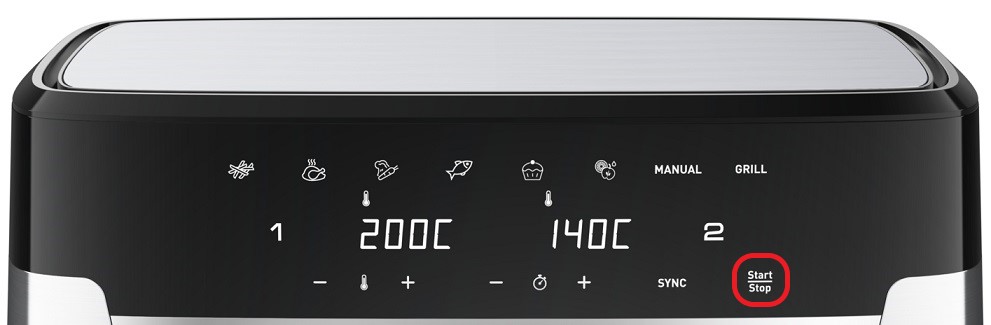
7 برامج مسبقة الإعداد لطهي أنواع متنوعة من الأطعمة دون الحاجة إلى مراقبتها (البطاطس المقليّة، الدجاج، الخضراوات، الأسماك، الحلويات، الأطعمة المجففة، والوضع اليدوي).
توفير الوقت والطاقة
تستهلك دوال إيزي فراي طاقة أقل بنسبة تصل إلى 70% وتقدّم مدة طهي أسرع بنسبة تصل إلى 40% مقارنة بالأفران التقليدية.*
*أجريت الاختبارات في عام 2023 على البطاطس المجمدة
تقنية القرمشة الإضافية
تمتع بأطعمة مقرمشة ذهبية اللون بقليل من الزيت أو بدون زيت، وبدهون مضافة أقل بنسبة 99%*. *أجريت الاختبارات في عام 2023 على البطاطس المجمدة
تطبيق وصفات مجاني
تطبيق مجاني مع خدمات طهي حصرية وتشكيلة متنوعة من الوصفات اليومية التي تجهز في غضون 15 دقيقة فقط.
سهولة التنظيف
استمتع بتنظيف بلا عناء مع درجين وشبكة يمكن تنظيفهما بأمان في غسالة الأطباق.
ضمان صيانة لمدة 15 عامًا
مُنتج مصمم لضمان سهولة التصليح مع تكلفة أقل وسرعة تسليم قطع الغيار لمدة 15 عامًا وأكثر، وذلك بفضل وجود أكثر من 6500 مركز تصليح في جميع أنحاء العالم.
يلزم عليك إنشاء حساب وتسجيل الدخول إلى التطبيق للوصول إلى هذه الميزة.
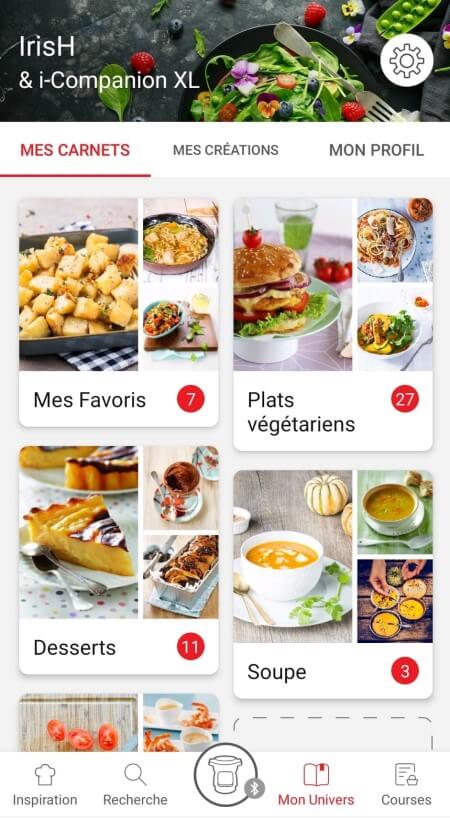
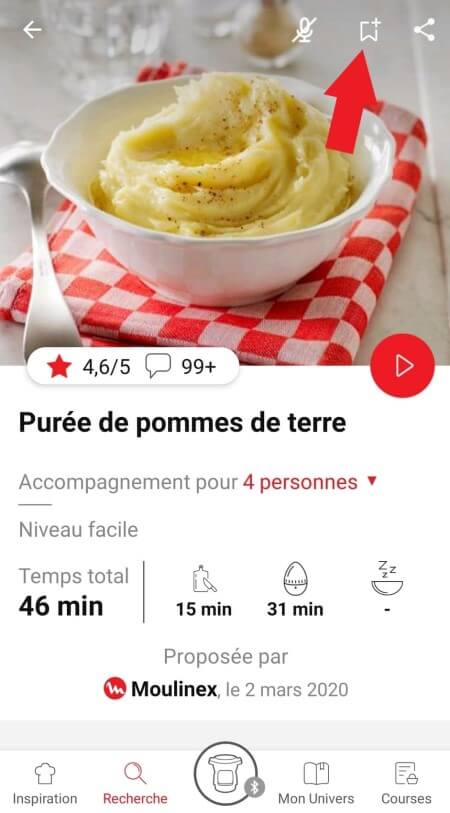
• انتقل إلى الوصفة التي تريد إضافة إشارة مرجعية لها وحدد شعار الإشارة المرجعية في الزاوية اليمنى العلوية. • تظهر علامة التبويب "My Notebooks" (دفاتر ملاحظاتي): حدد موقع "My Favorites" (المفضلة). • تمت إضافة الوصفة.
يحتوي التطبيق على محتوى ثري ويتطلب اتصال Wi-Fi ثابتًا حتى يتم تنزيله بشكل صحيح. إذا لم يتم تنزيل التطبيق بشكل صحيح، فقم بحذفه وحاول تنزيله مجددًا حينما يتوفر لديك اتصال Wi-Fi أكثر ثباتًا. وأثناء التثبيت الأولي، قد يستغرق التنزيل عدة دقائق بينما يقوم التطبيق بحفظ جميع الصور الموجودة على الهاتف الذكي أو الكمبيوتر اللوحي الموجود لديك.
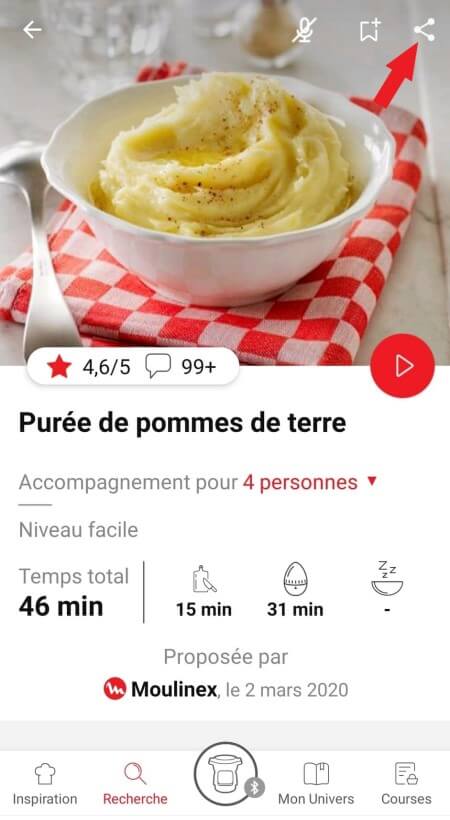
يتعيّن عليك إنشاء حساب وتسجيل الدخول إلى التطبيق لكي تصل إلى هذه الميزة. انقر فوق شعار المشاركة لعرض خيارات المشاركة. يمكنك بعد ذلك اختيار طريقة مشاركة هذه الوصفة.
يستخدم التطبيق إشعارات لتنبيهك عند انتهاء أوقات الطبخ باستخدام إشارة صوتية. إذا أردت إيقاف تشغيل هذه الإشارة، يمكنك إيقاف تنشيطها بسهولة من الكمبيوتر اللوحي أو الهاتف الذكي. يمكنك أيضًا تعطيل الأصوات في إعدادات المعلمات للإشعارات على الهاتف أو الكمبيوتر اللوحي.
لا يستخدم التطبيق إشعارات لتنبيهك عند انتهاء الطهي فحسب، ولكن أيضًا لإعلامك بالمحتويات الجديدة (معلومات، وصفات...) المتاحة. يمكنك تعطيلها، إذا أردت ذلك، من إعدادات الهاتف الذكي.
بمجرد الانتهاء من بحثك، تسهّل عليك عوامل التصفية الخاصة العثور على وصفات تلبي احتياجاتك.
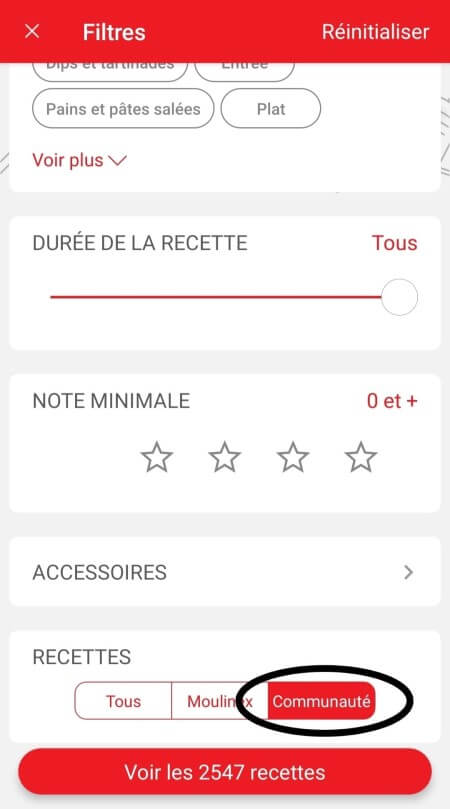
عامل التصفية القابل للتخصيص: • انقر فوق "Filter" (عامل التصفية) من أجل تصنيف الوصفات وفقًا لنوع الوجبة (مقبلات أو الطبق الرئيسي أو الحلوى)، والوقت الذي تستغرقه لإعداد الوصفة، والحد الأدنى للتقييم، ومواضيع الوصفات (أو مكوناتها)... • كما يمكنك اختيار تحديد وصفات العلامة التجارية فقط أو الوصفات التي اقترحها لك المجتمع.
تصنيف الوصفات: بمجرد الانتهاء من بحثك، يمكنك تصنيف وصفاتك حسب الشعبية والتقييم والمدة أو حسب الترتيب الأبجدي.
عند استخدام وظيفة البحث، قم باختيار "Filter recipes" (تصفية الوصفات). في قسم "الوصفات"، قم باختيار "Community" (المجتمع) فقط. ستستطيع بعد ذلك رؤية الوصفات من المجتمع.
ينبغي عليك إنشاء حساب وتسجيل الدخول إلى التطبيق للوصول إلى تلك الميزات.
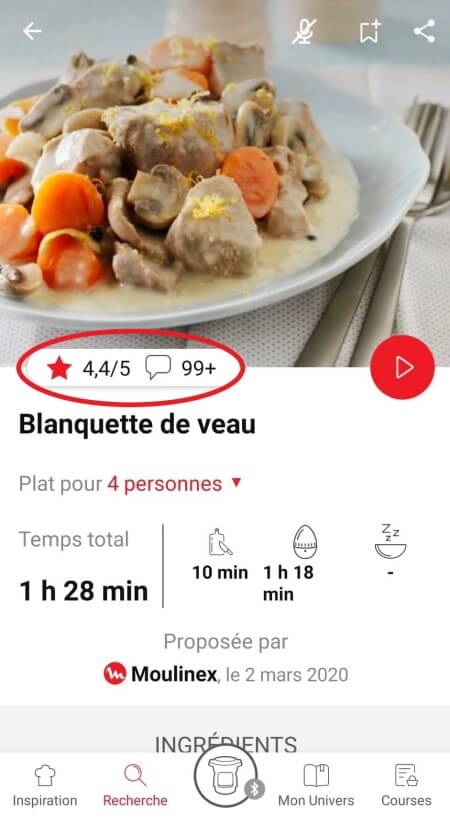
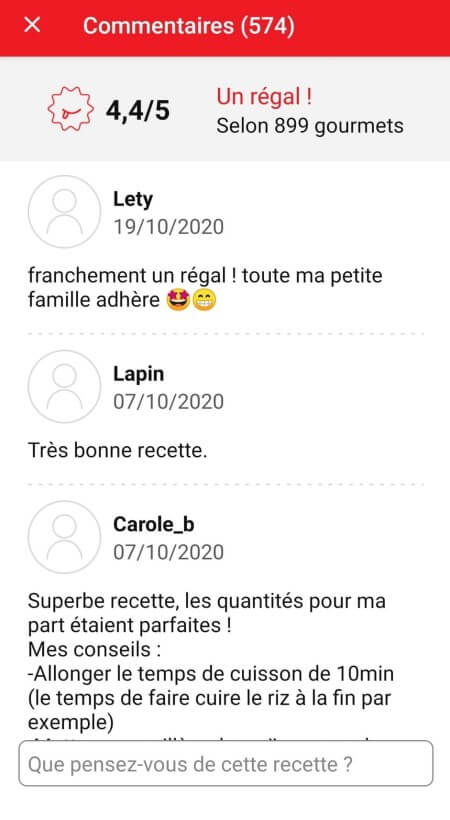
بمجرد تسجيل الدخول، ستستطيع قراءة التعليقات ورؤية الملاحظات التي كتبها أعضاء المجتمع بشأن الوصفة عن طريق النقر فوق حقل "notes/comments" (الملاحظات/التعليقات).
ينبغي عليك إنشاء حساب وتسجيل الدخول إلى التطبيق للوصول إلى تلك الميزات.
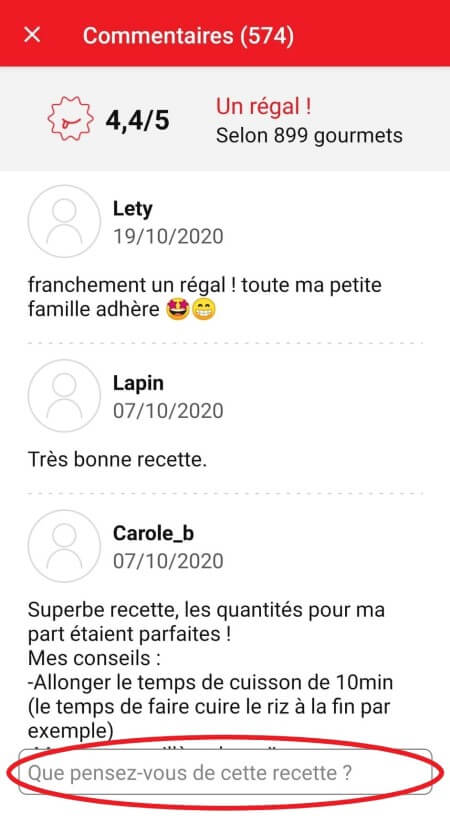
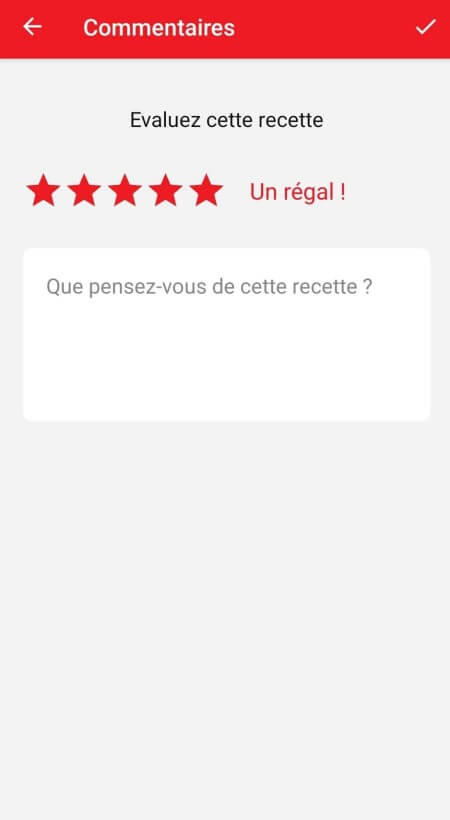
بمجرد تسجيل الدخول إلى حسابك، ستستطيع تقييم الوصفة وإضافة تعليق عن طريق اتباع التعليمات التي تظهر على الشاشة بعد النقر فوق حقل "notes/comments" (الملاحظات/التعليقات).
اختر علامة التبويب "My Universe" (عالمي) من شريط التنقل، ثم حدد الكتيب الذي ترغب في تعديله أو حذفه. انقر على رمز القلم أعلى يمين الشاشة، ثم حدد الإجراء الذي تريده ("Delete booklet" (حذف الكتيب) أو "Rename booklet" (إعادة تسمية الكتيب) أو "Delete recipes" (حذف الوصفات).
يلزم عليك إنشاء حساب وتسجيل الدخول إلى التطبيق للوصول إلى هذه الميزة.
• اختر علامة التبويب "My Universe" (عالمي) من شريط التنقل. • ستجد هناك كتيبات وصفاتك وستتمكن من إنشاء كتيبات جديدة عن طريق النقر فوق "New booklet" (كتيب جديد).
من المهم اختيار منتجك في التطبيق من أجل العثور على الوصفات المناسبة لذلك المنتج. وبتلك الطريقة، سيقترح التطبيق مئات الوصفات المثالية. وسيتيح لك ذلك أيضًا إضافة المواد الأخرى والحصول على الوصفات المرتبطة.
لم يعد التطبيق متوافقًا مع إصدارات Android 4.4.4 أو الإصدارات الأقدم، وذلك بسبب تعزيز أمان البيانات.
بقدر الإمكان، نوصي بتحديث جهازك إلى إصدار Android أحدث أو استخدام جهاز آخر متوافق مع التطبيق.
لن تسمح لك التحديثات بالاستمتاع بتجربة أغنى فحسب بفضل ميزاتها الجديدة وتوافقها مع أحدث التقنيات، ولكنها ستحميك أيضًا من الثغرات الأمنية المحتملة التي تم إصلاحها في الإصدارات الأحدث.
• في "My universe" (عالمي)، حدد "My profile" (ملف تعريفي). • انقر فوق صورة المنتج المسجل. • انقر فوق "Remove the product" (إزالة المنتج). سيطلب منك التطبيق بعد ذلك اختيار منتج.
يلزم عليك إنشاء حساب وتسجيل الدخول إلى التطبيق للوصول إلى هذه الميزة.
• انتقل إلى الوصفة التي تريد إضافة إشارة مرجعية لها وحدد شعار الإشارة المرجعية في الزاوية اليمنى العلوية. • تظهر علامة التبويب "My Notebooks" (دفاتر ملاحظاتي): حدد موقع "My Favorites" (المفضلة). • تمت إضافة الوصفة.
يتعيّن عليك إنشاء حساب وتسجيل الدخول إلى التطبيق لكي تصل إلى هذه الميزة. انقر فوق شعار المشاركة لعرض خيارات المشاركة. يمكنك بعد ذلك اختيار طريقة مشاركة هذه الوصفة.
يحتوي التطبيق على محتوى ثري ويتطلب اتصال Wi-Fi ثابتًا حتى يتم تنزيله بشكل صحيح. إذا لم يتم تنزيل التطبيق بشكل صحيح، فقم بحذفه وحاول تنزيله مجددًا حينما يتوفر لديك اتصال Wi-Fi أكثر ثباتًا. وأثناء التثبيت الأولي، قد يستغرق التنزيل عدة دقائق بينما يقوم التطبيق بحفظ جميع الصور الموجودة على الهاتف الذكي أو الكمبيوتر اللوحي الموجود لديك.
يستخدم التطبيق إشعارات لتنبيهك عند انتهاء أوقات الطبخ باستخدام إشارة صوتية. إذا أردت إيقاف تشغيل هذه الإشارة، يمكنك إيقاف تنشيطها بسهولة من الكمبيوتر اللوحي أو الهاتف الذكي. يمكنك أيضًا تعطيل الأصوات في إعدادات المعلمات للإشعارات على الهاتف أو الكمبيوتر اللوحي.
لا يستخدم التطبيق إشعارات لتنبيهك عند انتهاء الطهي فحسب، ولكن أيضًا لإعلامك بالمحتويات الجديدة (معلومات، وصفات...) المتاحة. يمكنك تعطيلها، إذا أردت ذلك، من إعدادات الهاتف الذكي.
ينبغي عليك إنشاء حساب وتسجيل الدخول إلى التطبيق للوصول إلى تلك الميزات.
بمجرد تسجيل الدخول إلى حسابك، ستستطيع تقييم الوصفة وإضافة تعليق عن طريق اتباع التعليمات التي تظهر على الشاشة بعد النقر فوق حقل "notes/comments" (الملاحظات/التعليقات).
عند استخدام وظيفة البحث، قم باختيار "Filter recipes" (تصفية الوصفات). في قسم "الوصفات"، قم باختيار "Community" (المجتمع) فقط. ستستطيع بعد ذلك رؤية الوصفات من المجتمع.
بمجرد الانتهاء من بحثك، تسهّل عليك عوامل التصفية الخاصة العثور على وصفات تلبي احتياجاتك.
عامل التصفية القابل للتخصيص: • انقر فوق "Filter" (عامل التصفية) من أجل تصنيف الوصفات وفقًا لنوع الوجبة (مقبلات أو الطبق الرئيسي أو الحلوى)، والوقت الذي تستغرقه لإعداد الوصفة، والحد الأدنى للتقييم، ومواضيع الوصفات (أو مكوناتها)... • كما يمكنك اختيار تحديد وصفات العلامة التجارية فقط أو الوصفات التي اقترحها لك المجتمع.
تصنيف الوصفات: بمجرد الانتهاء من بحثك، يمكنك تصنيف وصفاتك حسب الشعبية والتقييم والمدة أو حسب الترتيب الأبجدي.
ينبغي عليك إنشاء حساب وتسجيل الدخول إلى التطبيق للوصول إلى تلك الميزات.
بمجرد تسجيل الدخول، ستستطيع قراءة التعليقات ورؤية الملاحظات التي كتبها أعضاء المجتمع بشأن الوصفة عن طريق النقر فوق حقل "notes/comments" (الملاحظات/التعليقات).
يلزم عليك إنشاء حساب وتسجيل الدخول إلى التطبيق للوصول إلى هذه الميزة.
• اختر علامة التبويب "My Universe" (عالمي) من شريط التنقل. • ستجد هناك كتيبات وصفاتك وستتمكن من إنشاء كتيبات جديدة عن طريق النقر فوق "New booklet" (كتيب جديد).
اختر علامة التبويب "My Universe" (عالمي) من شريط التنقل، ثم حدد الكتيب الذي ترغب في تعديله أو حذفه. انقر على رمز القلم أعلى يمين الشاشة، ثم حدد الإجراء الذي تريده ("Delete booklet" (حذف الكتيب) أو "Rename booklet" (إعادة تسمية الكتيب) أو "Delete recipes" (حذف الوصفات).
من المهم اختيار منتجك في التطبيق من أجل العثور على الوصفات المناسبة لذلك المنتج. وبتلك الطريقة، سيقترح التطبيق مئات الوصفات المثالية. وسيتيح لك ذلك أيضًا إضافة المواد الأخرى والحصول على الوصفات المرتبطة.
• في "My universe" (عالمي)، حدد "My profile" (ملف تعريفي). • انقر فوق صورة المنتج المسجل. • انقر فوق "Remove the product" (إزالة المنتج). سيطلب منك التطبيق بعد ذلك اختيار منتج.
اغسلوا قطع البطاطس مرّتين بالماء قبل قليها حتى تتخلّصوا من النشاء الزائد. من الضروري تجفيفها قبل قليها بمنديل شاي نظيف ذات قدرة عالية على امتصاص السوائل ثم تجفيفها أخيرًا بورق المطبخ. إذا كنتم ستقلون بطاطس مجمّدة، فلن تحتاجوا إلى الزيت لأنها تحوي عليه وإضافته سيجعلها غير مقرمشة. إذا كنتم تستخدمون ميّزة 2 بـ1 (الوعاء + الصينية) بعد طهي الطعام على الصينية، اقلوا البطاطس لمدّة تتراوح ما بين 2 و5 دقائق إضافية بعد رفعها عن الصينية حتى تصبح مقرمشة.
توجد عدّة أسباب وراء ذلك: • ربما استخدمتم نوع البطاطس غير المناسب. •لم تغسلوا وتجفّفوا البطاطس بما يكفي قبل طبخها وما تزال تحوي على كثير من النشاء. • أو أنّ البطاطس سميكة جداً. قطعوا البطاطس إلى شرائح أرفع. • لم تستخدموا كميّة كافية من الزيت. ضعوا مزيدًا من الزيت. • قد يكون الفلتر مسدودًا. لذلك، نظّفوا الفلتر.
يُمكن أن يؤثر حجم البطاطس على قرمشتها أو طراوتها. فكلّما كانت البطاطس أرق، ازدادت قرمشتها، وبالعكس، فإذا ازدادت سماكتها تصبح أكثر طراوة في الداخل. يُمكنكم تغيير وقت الطبخ وحجم تقطيع البطاطس بحسب رغبتكم: رقيقة: 8 بـ 8 ملم/العادية: 10 بـ 10 ملم/السميكة: 13 بـ 13 ملم.
حتى تحصلوا على أفضل النتائج، اغسلوا البطاطس بأكملها، ثمّ اغسلوها بعد تقطيعها في الكثير من الماء حتى تصبح مياه الغسل صافية. يُساهم هذا الأمر في التخلّص من أكبر قدر ممكن من النشاء وبالتالي يمنع التصاقها. جفّفوها بعد ذلك جيّدًا مستخدمين مناديل المطبخ الجافة وذات قدرة عالية على الامتصاص. يجب أن تكون البطاطس جافة قبل طبخها.
بشكل عام، ننصحكم باستخدام البطاطس المخصّصة للقلي في جهاز فراي ديلايت. أما بالنسبة للبطاطس الجديدة والغنيّة بالماء، ننصحكم بطهي شرائح البطاطس بضع دقائق إضافيّة. يؤثّر حجم شرائح البطاطس على مستوى القرمشة والليونة. كلّما كانت شرائح البطاطس رقيقة كلما كانت النتيجة مقرمشة، وفي المقابل، كلما كانت سميكة كانت ليّنة من الداخل. بحسب رغبتكم، يمكنكم تنويع قطع البطاطس : - رقيقة : 8 x 8 ملم. - عادية: 10 x 10 ملم. - سميكة : 13 x 13 ملم.
يسمح جهاز فراي ديلايت بقلي البطاطس المجمّدة. وبما أنها مطهوة مسبقاً، فليس من الضروريّ إضافة الزيت.
Spread evenly across the basket allowing hot air to circulate evenly. For larger batches, cook in multiple smaller batches to ensure consistent results.
All cooking times are a guide as results may vary. With air fryer cooking you are using a smaller cooking area, and it does not take as long to cook. We would suggest reducing the cooking times and temperature.
Before first use, clean all accessories in hot water using a non-abrasive sponge. Run your Easy Fry empty using the "Manual" mode at 200°C for 45 minutes (without any accessories inside) to eliminate any manufacturing residue and new smell.
Once cooled, use a damp sponge or cloth to clean the inside of the appliance and heating element. It is recommended to clean the removable parts by hand with hot soapy water and non-abrasive sponge.
Do not use any aggressive cleaning agents, scouring sponges or abrasive pads. Do not use any special metal cleaning agents. Never immerse or run the appliance under water.
For more stubborn stains, removable parts can be left to soak in hot soapy water before cleaning with a sponge (scouring powder and scouring pads are not recommended).
To remove lingering smells from the basket after washing with soap and water, rub the cookware with a cut lemon or rinse it with a mixture of water and lemon juice, then rinse thoroughly with water.
لقد قمت غالبًا بوضع الملح على طعامك أثناء عملية الطهي. لا تقم أبدًا بوضع الملح على طعامك قبل انتهاء عملية الطهي لتجنب خدش وعاء ActiFry. بالنسبة للطرازات التي تحتوي على صينية الطهي، لا يُنصح باستخدام أي أدوات معدنية، للحفاظ على جودة صينية الطهي لفترة أطول.
قد تكون هناك عدة تفسيرات: • لم يتم توصيل الجهاز بالكهرباء بشكل صحيح. • لم تضغط بعد على زر الطاقة أو قمت بالضغط عليه بشكل غير صحيح. حاول مرة أخرى مع الضغط عليه بإحكام. • الجهاز لا يعمل، بالرغم من ضغطك على زر الطاقة. تأكد من إغلاق الغطاء بإحكام. • المحركات تعمل ولكن الجهاز لا يسخن. قم بتسليم الجهاز إلى مركز خدمة معتمد ليتم فحصه.
After following the instructions in the user manual for starting the appliance, make sure that your electrical socket is working by plugging another appliance. If it still does not work, do not try to dismantle or repair the appliance yourself, instead, take it to an approved repair centre.
أجل، فهذا جهاز فريد مُتعدّد المهام، ويُمكن استخدامه في طبخ تشكيلة متنوّعة من الأطعمة. يُمكن استخدام هذا الجهاز في تحضير عدّة وصفات، بدءًا من المقبّلات ووصولاً إلى الحلويات. يُمكنكم أيضًا تحضير البطاطس المقلية المقرمشة، والدجاج الطريّ أو حتى كيكة الفواكه...
The appliance is very versatile and comes with 8 functions, including air fry, bake, roast and grill, making it perfect for a variety of cooking tasks.
An air fryer is a compact appliance that uses rapid air circulation whereas a convection oven circulates hot air more gently using a fan making an air fryer faster and more energy efficient.

 تُستخدم ملفات تعريف الارتباط لقياس نسبة الجمهور وإضفاء طابع شخصي حتي يتسنى لنا تحسين استخدامك للمنتج.