Your account, to be created from the app, allows you to benefit from additional services related to the interaction of your app with your product: • Find the recipes saved in your notebooks and favourites directly on the robot's screen. • Follow remotely the progress of the recipe on your product and receive recipe notifications. • Display on your product a recipe that you have selected in the application.
Even if your product doesn't need a very fast WiFi connection to work, the received WiFi signal must still be stable. If the screen displays a connectivity error, you can move the product closer to your box or add a WiFi repeater (see FAQ 'I don't have WiFi access in my kitchen').
If your product loses the WiFi connection during a recipe, you will be able to finish your recipe without any inconvenience. However, the videos of that recipe will no longer be accessible until the connection is re-established.
If the WiFi connection is interrupted during an update, this cannot be completed. Your product will be able to reboot to its current version and this update will be rescheduled the next time you start it.
If your smartphone loses internet connection (WiFi or 4G) during a recipe it will have no impact on your product which will be able to execute the recipe without any problem. You will simply no longer be able to follow the progress of the recipe remotely on your smartphone and you will no longer receive notifications about the end of a step or the addition of an ingredient.
Your product can only be associated with one account. However, any application that is connected to this account can interact with this product. If you have a tablet and a smartphone, or if other members of your household want to interact with your product, they can simply connect their application using your account.
As soon as an update is available, your product when it connects to the WiFi will suggest you to do the update.
Some updates are priorities for security reasons and you will need to perform them before you can use your product. Others may be delayed. You can then perform them now or later by going to your product's settings.
If an update fails, you can download it again. If despite several attempts you are unable to install it, move the product closer to your box, the connection from your kitchen may be too weak to download it. If the update fails even close to your box, please contact our customer service.
If your product is associated with your user account, you will be able to follow the progress of your recipe on your application. You will also receive end-of-stage or alert notifications. If you do not receive these notifications, please enable them in your iOS or Android settings.
To remotely send a recipe from your application to your product, simply open a recipe and click on the icon with your product. If your product is on standby, it will open on your product as soon as it connects to Wifi. If the product is running, it will be displayed in a few seconds if your product is not already making another recipe.
Place your device on a flat, stable surface. To obtain an optimal connection between your device and your box, it is recommended to position your device in a place where the Wifi signal received from your box is strong. You can test the connection by positioning your smartphone at the location of your product to see if the WiFi signal received at that location is strong enough. If the connection is interrupted (connection symbol crossed out), please bring your device and your box closer together to reestablish the connection. The presence of the fixed connection indicator (application or product) ensures that your devices are connected.
قبل استخدامه للمرة الأولى، ننصحك بغسل جميع ملحقات الخلاط بالماء الساخن والصابون، مع توخي الحذر من جرح نفسك بالشفرات الحادة للغاية. ليس من الضروري تنظيف جسم الخلاط قبل الاستخدام.
يجب أن يكون الغطاء في مكانه دائمًا عندما يكون الجهاز قيد التشغيل. لإضافة مكونات أثناء الخلط، إرفعي غطاء التغذية وأدخلي المكونات عبر فتحة التعبئة الموجودة في الغطاء.
Thanks to the function "In my fridge" you can indicate the ingredients that you have at your disposal and we will suggest suitable recipes.
• You can access this feature from the home screen. • Add one or two ingredients by typing their name in the search bar and selecting it from the suggestions. • You can then enter the weight of the added ingredients so that we can offer you recipes for those quantities.
لتنظيف هيكل الجهاز، يجب أولا أن يفصل عن الكهرباء ثم يمسح بقطعة قماش رطبة. لتنظيف الوعاء، استخدموا الماء والصابون أو سائل غسيل الصحون. بعض الأوعية تتوافق مع "غسالة الأطباق" بأمان، يمكنكم التأكد من هذا الأمر من خلال قراءة إرشادات الاستخدام.
ربما يوجد الكثير من الطعام، أو أن بعض القطع كبيرة للغاية أو صلبة للغاية. يمكنك تقليل حجم المكونات أو مقدارها، أو إضافة بعض السائل.
يجب استخدام الخلاط دائمًا مع وضع الغطاء أو الواقي في مكانه كما هو موضح في التعليمات. يجب عدم وضع اليد أبدًا في إبريق الخلاط عند وضعه على وحدة الموتور. إذا كنت بحاجة إلى دفع الطعام لأسفل، فاستخدم أداة مناسبة، ويمكنك استخدام ملعقة على سبيل المثال.
ربما تم وضع الجهاز على سطح غير مستو ومستقر، ولذلك فإن الجهاز غير مستقر. قد يكون حجم المكونات المخلوطة كبيرًا جدًا، قللي من مقدار المكونات. إذا استمر الاهتزاز، فاتصلي بمركز تصليح معتمد.
التسرب عبر الغطاء (فائض): • حجم المكونات كبير للغاية، لا تتجاوزوا أقصى مستوى ملء للوعاء على النحو المذكور في تعليمات الاستخدام. • الغطاء غير موضوع بشكل صحيح، أقفلوه بإحكام على إناء الخلط. إذا كان الغطاء مزودًا بمانع تسرب، فتحققوا من حالته وغيروه إذا لزم الأمر.
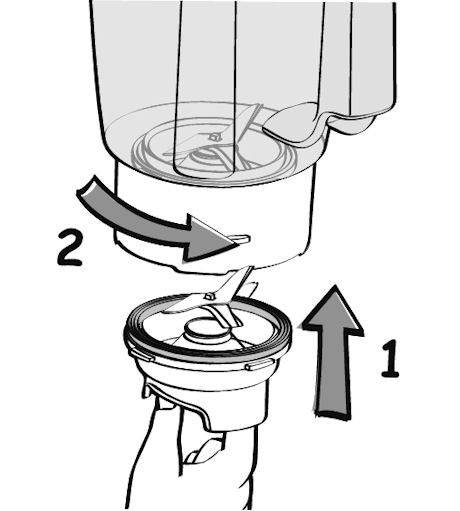
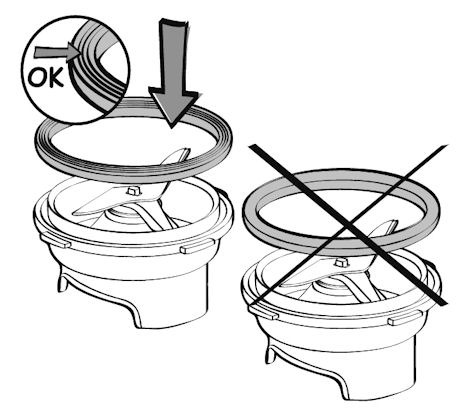
تسرب بقاع الإناء: • لا يحتوي جهازكم على شفرة قابلة للفصل : قد يكون مانع التسرب الموجود على الشفرة متضرراً، افحصوه بمساعدة تقني متخصص. • إذا كان جهازكم يحتوي على شفرة قابلة للفصل : تحققوا من وضعها بشكل صحيح على الإناء : هيكل الشفرات يجب أن يركب جيدا داخل الإناء (لا يجب أن يترك فراغ بين هيكل الشفرات وقعر الإناء). • تأكد من أن مانع التسرب يتم وضعها بالطريقة الصحيحة حول وحدة النصل - يجب أن تكون 3 أضعاف مانع التسرب مرئية بمجرد وضعها في مكانها. إذا تم وضعه في الاتجاه الآخر، فلن تكون قادرا على قفل وحدة شفرة على الوعاء • تحققوا من حالة مانع التسرب وغيروه إذا لزم الأمر. • تحققوا من أن الإناء غير مشقوق أو مكسور بسبب اصطدام ما.
إذا كان العطب مهما فقوموا بأخذ الجهاز إلى تقني إصلاح متخصص.

Your product is not connected to the WiFi (via the modem or via a mobile phone). Therefore, you can only access the 250 recipes contained in your product. We advise you to check that WiFi is activated on your modem/phone and to get closer to your modem/phone. We remind you that your product cannot connect to a 5GHz WiFi network, a WiFi network with a password containing special characters, as well as open WiFi networks (which do not require a password).
Your product is connected to the WiFi (via modem, mobile phone,...), but not connected to the database. Therefore, you can only access the 250 recipes contained in your product.
Your product is connected to the WiFi (via modem, mobile phone,...) and to the database. As a result, you can access more than 1,500 recipes.