دليل الاستخدام MASTERBLEND - Tefal

الرقم المرجعي : FP110B30

التعليمات والدليل
أسئلة شائعة
The WiFi icon, especially visible from the home screen, indicates whether your product is connected or not.

WiFi icon crossed outThe product is not connected.
WiFi icon exclamation markThe product is connecting.
WiFi iconThe product is connected.
Your account, to be created from the app, allows you to benefit from additional services related to the interaction of your app with your product:
• Find the recipes saved in your notebooks and favourites directly on the robot's screen.
• Follow remotely the progress of the recipe on your product and receive recipe notifications.
• Display on your product a recipe that you have selected in the application.
Even if your product doesn't need a very fast WiFi connection to work, the received WiFi signal must still be stable.
If the screen displays a connectivity error, you can move the product closer to your box or add a WiFi repeater (see FAQ 'I don't have WiFi access in my kitchen').
If your product loses the WiFi connection during a recipe, you will be able to finish your recipe without any inconvenience.
However, the videos of that recipe will no longer be accessible until the connection is re-established.
If the WiFi connection is interrupted during an update, this cannot be completed. Your product will be able to reboot to its current version and this update will be rescheduled the next time you start it.
If your smartphone loses internet connection (WiFi or 4G) during a recipe it will have no impact on your product which will be able to execute the recipe without any problem. You will simply no longer be able to follow the progress of the recipe remotely on your smartphone and you will no longer receive notifications about the end of a step or the addition of an ingredient.
Your product can only be associated with one account.
However, any application that is connected to this account can interact with this product.
If you have a tablet and a smartphone, or if other members of your household want to interact with your product, they can simply connect their application using your account.
As soon as an update is available, your product when it connects to the WiFi will suggest you to do the update.


Some updates are priorities for security reasons and you will need to perform them before you can use your product.
Others may be delayed. You can then perform them now or later by going to your product's settings.
If an update fails, you can download it again.
If despite several attempts you are unable to install it, move the product closer to your box, the connection from your kitchen may be too weak to download it.
If the update fails even close to your box, please contact our customer service.
If your product is associated with your user account, you will be able to follow the progress of your recipe on your application.
You will also receive end-of-stage or alert notifications.
If you do not receive these notifications, please enable them in your iOS or Android settings.
To remotely send a recipe from your application to your product, simply open a recipe and click on the icon with your product.
If your product is on standby, it will open on your product as soon as it connects to Wifi.
If the product is running, it will be displayed in a few seconds if your product is not already making another recipe.
Place your device on a flat, stable surface.
To obtain an optimal connection between your device and your box, it is recommended to position your device in a place where the Wifi signal received from your box is strong. You can test the connection by positioning your smartphone at the location of your product to see if the WiFi signal received at that location is strong enough.
If the connection is interrupted (connection symbol crossed out), please bring your device and your box closer together to reestablish the connection.
The presence of the fixed connection indicator (application or product) ensures that your devices are connected.
قبل استخدام جهازكم للمرّة الأولى، إغسلوا كل أجزاء الملحقات بالماء الدافئ والصابون (راجعوا قسم التنظيف في كتيّب التعليمات الخاصّ بكم). أشطفوا وجفّفوا.
ضعوا وحدة المحرّك على سطح مستو، نظيف وجاف.
أوصلوا جهازكم بالكهرباء.
يجب ترك السوائل لتبرد حتى تصل إلى درجة حرارة الغرفة قبل هرسها. لا تضعوا المكونات الساخنة في الوعاء فقد تتسبّب حرارة المكونات في تلف مانع التسرّب.
تستخدم السرعات العالية مع ملحقات الخفق، التقطيع والبشر، بينما تستخدم السرعات المنخفضة مع عصّارة الليمون وأداة العجن.
يستخدم زر التشغيل المتقطع عندما تحتاجون إندفاعات قصيرة من الطاقة على السرعة القصوى. تستخدم هذه الوظيفة عادة عند استعمال الخلاط ويتحكّم بها المستخدم أيّ أنكم تضبطون وقت عمل الماكينة على هذه الوضعيّة. هذه طريقة فعّالة لتجنّب المعالجة المفرطة للمكوّنات. على سبيل المثال، يمكن استخدامها لخلط الفواكه مع عجينة الكيك أو خلط الفواكه الطريّة مع الزبادي لإعداد السموثي.
تستخدم شفرة الإستانلس ستيل في: المزج، والخلط، والهرس، تحضير فتات الخبز، وتحضير مزيج المخبوزات والكيك. يستخدم ملحق الخلاط لمزج السوائل فقط، مثل: الحساء، والميلك شيك، وغيرهما من الوصفات، أو هرس الفواكه الطريّة أو الخضراوات والفواكه المطبوخة. يجب عدم إستخدامها لفرم اللحم أو تحضير العجين والمعجّنات.
On the home page, drag the menu to the right and select "Stand by".
Thanks to the function "In my fridge" you can indicate the ingredients that you have at your disposal and we will suggest suitable recipes.


• You can access this feature from the home screen.
• Add one or two ingredients by typing their name in the search bar and selecting it from the suggestions.
• You can then enter the weight of the added ingredients so that we can offer you recipes for those quantities.
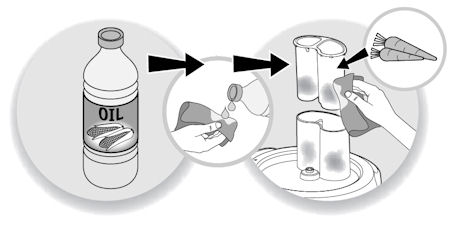
لتقليل التلوّن، إفركوا المناطق الملوّنة بقطعة قماش أو منشفة منقوعة في زيت الطهي ثم أغسلوها بالطريقة المعتادة.
من الضروري غسلها مباشرةً بعد الاستخدام لتجنب اي بقع.

إفصلوا المنتج عن التيار الكهربائيّ.
لتنظيف الملحقات بسهولة، أشطفوها فور الإنتهاء من الإستخدام.
إغسلوا الملحقات وجفّفوها: يمكن غسلها في غسّالة الأطباق، أو بالماء، أو تحت الصنبور، باستثناء وحدة المحرّك، ومجموعة المفرمة (المصغّر + رأس المفرمة)*، ووحدة محرّك الخلاط*، وجسم العصّارة* (* بحسب الطراز). إمسحوا هذه الأجزاء بقطعة إسفنجيّة رطبة.
ما ان تجفّفوها، إدهنوا الشفرة وشبكة المفرمة بزيت طهي للحفاظ عليها مشحّمة.
اسكبوا الماء الساخن مع بضع قطرات من سائل تنظيف الأطباق في وعاء الخلط، أغلقوا الغطاء المزوّد بغطاء التغذية، وشغّلوه عدّة مرّات، ثمّ أفصلوا الجهاز عن التيار الكهربائيّ وأشطفوا الوعاء.
تعاملوا مع شفرات الملحقات بحذر فهي حادّة للغاية.
يمكن غسل معظم أجزاء محضّر الطعام في غسّالة الأطباق، مثل الإناء، أو الشفرات، ولكن غالبًا ما تكون هذه ميزة لمنتج معيّن، لذا لمزيد من المعلومات يرجى الرجوع إلى تعليمات إستخدام الجهاز والعناية به. تجنّبوا وضع علبة المحرّك الخاص بمحضّر الطعام في غسّالة الأطباق إطلاقًا.
تأكّدوا من أنّ نظام القفل في مكانه تمامًا. تستلزم جميع محضّرات الطعام وضع الإناء والغطاء في مكانهما الصحيح قبل بدء التحضير، هذه خاصيّة أمان حتّى لا تدور الشفرات وهي مكشوفة. عند وضع الإناء والغطاء في مكانهما الصحيح بإحكام، تتحاذى العلامات الموجودة عليهما.
لا تستخدموا جهازكم. لتفادي أي خطر، استبدلوه من أحد مراكز الاصلاح المعتمدة.
Please check the WiFi icon on your product.

WiFi icon crossed out
Your product is not connected to the WiFi (via the modem or via a mobile phone).
Therefore, you can only access the 250 recipes contained in your product.
We advise you to check that WiFi is activated on your modem/phone and to get closer to your modem/phone.
We remind you that your product cannot connect to a 5GHz WiFi network, a WiFi network with a password containing special characters, as well as open WiFi networks (which do not require a password).

WiFi icon exclamation mark
Your product is connected to the WiFi (via modem, mobile phone,...), but not connected to the database.
Therefore, you can only access the 250 recipes contained in your product.

WiFi icon
Your product is connected to the WiFi (via modem, mobile phone,...) and to the database. As a result, you can access more than 1,500 recipes.
Try checking that the interlocking system is fully in place. All Food Processors need to have the bowl and the lid fitted correctly before processing will start, this is a safety feature so that the blades cannot spin while exposed. When the bowl and lid are locked into place securely, the markings on them will be aligned.

وضع السوائل الساخنة في الوعاء يمكنه تشويه موانع التسرّب؛ كذلك إستخدام كميّة كبيرة من السوائل. أما عدم وضع مانع تسرّب المحور بشكل صحيح بعد الغسل فقد يؤدّي الى النتيجة نفسها.
يعمل قرص الإستحلاب بطريقة مختلفة عن أسلوب الخفاق المزدوج التقليدي. عند استخدام قرص إستحلاب، يدور الخليط حول الوعاء وعند استخدام المضارب المزدوجة، يدمج الهواء في الخليط بشكل أسرع، منتجًا عجين أو خليط أخفّ وهشّ.
محضّر الطعام عبارة عن جهاز صمّم لإنجاز معظم المهام التي ترغبون بالقيام بها في المطبخ عند تحضير الطعام، بشكل أسرع وبمجهود أقلّ. تتمثل الوظائف الأوليّة لمحضّر الطعام في الفرم، والبشر، والمزج. تتميّز تقريبًا كل محضّرات الطعام المتاحة بوجود وظائف البشر والتقطيع مهما اختلف الإسم.
تعمل العجّانة بشكل مختلف عن محضّر الطعام، حيث إن الأدوات المستخدمة للمزج معلّقة من ذراع علوي نزولاً إلى الطعام، بينما في محضّر الطعام، تعمل أدوات المزج من أسفل المكوّنات.  تستخدم العجّانة في المقام الأول لمزج خليط العجين والكيك. يمكن أن يؤدّي محضّر الطعام هذه المهام ولكن ليس بنفس كفاءة العجانة. إذا كنتم تنوون إعداد الكيك، فينبغي مراعاة عدد مرّات القيام بهذه المهمّة. إذا كنتم ستقومون بهذا الأمر بشكل متكرّر، فإن العجّانة هي الإختيار الأفضل. من المهمّ ملاحظة حقيقة أن محضّر الطعام أصغر بكثير من العجانة.
يحتوي الجهاز الخاص بكم على مواد قيّمة يمكن إستخراجها أو إعادة تدويرها. لذا اتركوه في نقطة محليّة لتجميع النفايات المدنيّة.
يرجى الذهاب إلى قسم "الملحقات" من الموقع لسهولة العثور على كل ما تحتاجون إليه للمنتج الخاص بكم.
يمكنكم العثور على مزيد من المعلومات التفصيليّة في قسم الضمان من هذا الموقع.
إذا كنت تعتقد أن هناك جزء واحد ناقص، يرجى الاتصال بمركز خدمات المستهلك وسوف نساعدك في إيجاد حل مناسب.